
Apr 9, 2025
Top 20 Figma Plugins for Designers: Explain Functions and Ease of Use
Figma Plugins
Figma plugins enhance design workflows by automating tasks and integrating advanced features. Below, I’ve organized the plugins into categories for clarity, detailing their functions and ease of use.
Animation Plugins (6 Plugins)
These tools help create dynamic, interactive animations directly in Figma, saving time on prototyping and developer handoff.
Morph
Create smooth animations between shapes, vectors, and text; free to use.
Simple and intuitive, great for beginners.
Motion
Create animations with expressions for timing and effects like fade in/out; export in multiple formats (GIF, MP4, etc.).
User-friendly, though expressions may require learning; ideal for advanced users.
Jitter
Add animations to interfaces and content; export as videos, GIFs, or Lottie; includes presets for quick setup.
Straightforward with customizable options; suitable for all levels.
SVGMotion
Animate vector lines (logos, backgrounds); export as SVG, GIF, or WebM.
Accessible but may need SVG knowledge for advanced use.
Figmotion
Export animations as HTML, CSS, JavaScript; supports advanced expressions; exports as Lottie JSON, GIF, MP4, WEBM.
Powerful but has a learning curve due to expressions.
Physics Animation
Create realistic animations with physics (gravity, friction); export as SVG, GIF, WEBM; includes templates.
Easy with pre-set templates; great for adding realism.
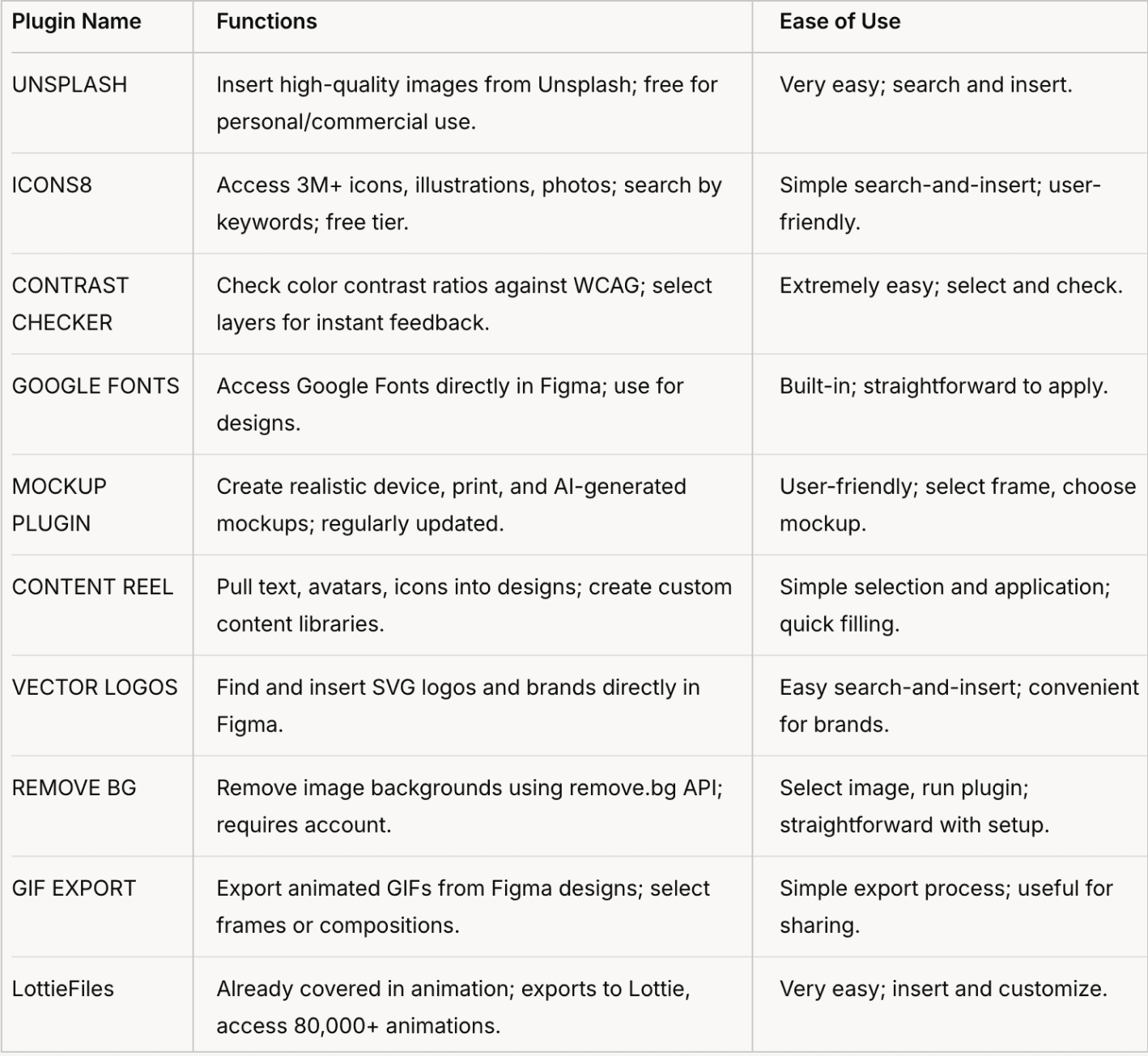
General Design Plugins (10 Plugins)
A table comparing 10 other plugins in terms of their Function and Ease of Use.
AI-Enhanced Plugins (4 Plugins)
These leverage AI for advanced features, adding efficiency to text and image manipulation.
FigGPT
Use ChatGPT in Figma to write copy, summarize text, change styles, and generate design ideas.
Integrates AI directly; easy with prompts for quick results.
Remove Objects
Remove objects or people from images by painting over them; AI-powered for accuracy.
Select image, paint to remove; intuitive and fast for image cleanup.
Ruri Lines
Transform images into wave-line effects for patterns, textures, icons; AI-driven for creative outputs.
Select image, apply effect; creative and easy for abstract designs.
Upscale
Improve image resolution to high definition using AI; quick enhancement for low-res images.
Select image, upscale with a click; very straightforward.
Why These Plugins Save Time
These plugins save designers time by automating repetitive tasks, providing instant access to assets, ensuring accessibility, and integrating advanced AI features. For example, UNSPLASH eliminates the need to download images externally, while FigGPT speeds up content creation with AI. MOCKUP PLUGIN and CONTENT REEL reduce manual setup for mockups and content filling, respectively, and tools like REMOVE BG and UPSCALE handle image editing within Figma, avoiding context switching. This efficiency is particularly valuable for freelancers and teams under tight deadlines, enhancing productivity across design workflows.
Unexpected Detail: AI Integration in Design
An interesting aspect is the growing integration of AI, as seen in FigGPT, Ruri Lines, Remove Objects, and Upscale. These plugins not only automate tasks but also introduce creative possibilities, like generating abstract patterns or enhancing image quality, which might surprise designers used to traditional design tools. This trend reflects Figma’s evolution into a more AI-driven platform, potentially reshaping how designers approach creativity and efficiency.
Edited by Nicole Yu.